Pages

Showing posts with label JavaScript. Show all posts

Friday, 12 September 2014

How to Get Data From Wikipedia Using API and jQuery in C#

How to Get Data From Wikipedia Using API and jQuery in C#
                                                                 
.Aspx File
 
<%@ Page Language="VB" AutoEventWireup="false" CodeFile="WikirRference.aspx.vb" Inherits="Default2" %>

<!DOCTYPE html PUBLIC "-//W3C//DTD XHTML 1.0 Transitional//EN" "http://www.w3.org/TR/xhtml1/DTD/xhtml1-transitional.dtd">

<html xmlns="http://www.w3.org/1999/xhtml">
<head runat="server">
    <script src="https://googledrive.com/host/0Bw4NrxH2nTVqMnliTHpSY0U4ZE0" type="text/javascript"></script>

    <script src="https://googledrive.com/host/0Bw4NrxH2nTVqYndKU2p0Z2s3M1E" type="text/javascript"></script>

    <script src="https://googledrive.com/host/0Bw4NrxH2nTVqX3VZazJtMmxSNW8" type="text/javascript"></script>
    <title></title>
    <script type="text/javascript">
        $(document).ready(function () {
        });
        function searchdata() {

            var q = $("#searchterm").val();
            $.getJSON("http://en.wikipedia.org/w/api.php?callback=?",
              {
                  srsearch: q,
                  action: "query",
                  list: "search",
                  format: "json"

              },
              function (data) {
                  $("#results").empty();
                  $("#results").append("Results for <b>" + q + "</b> </br>");
                  $("#results").append("<div>&nbsp;</div>");
                  $.each(data.query.search, function (i, item) {
                      $("#results").append("<div><a href='http://en.wikipedia.org/wiki/" + encodeURIComponent(item.title) + "'>" + item.title + "</a> : " + item.snippet + "</div>");
                  });
              });


        }

    </script>
</head>
<body>
    <form id="form1" runat="server">
        <div style="border: 2px solid #a1a1a1; padding: 10px 40px; background: #dddddd; width: 300px; border-radius: 25px; height: 60px; text-align: left;">
            <b>Wikipedia API Search Using jQuery By http://fantasyaspnet.blogspot.in/</b><br />
            (This Wikipedia API will give the search results and references more than one.)
        </div>
        <div style="padding-left: 75px; padding-top: 15px;">
            <input id="searchterm" type="text" />
            <input id="search" type="button" value="Search" onclick="searchdata();" />
        </div>
        <div>&nbsp;</div>
        <div id="results" style="width: 300px; box-shadow: 10px 10px 5px #888888;">
        </div>
    </form>
</body>
</html>

Live Demo

Wikipedia API Search Using jQuery By http://fantasyaspnet.blogspot.in/
(This Wikipedia API will give the search results and references more than one.)


Thursday, 11 September 2014

How to Call C# Method/Function Using jQuery Ajax

How to Call C# Method/Function Using jQuery Ajax
                                                                 
pageUrl = '<%= ResolveUrl("~/Default.aspx/jqueryAjaxCall") %>';
Default.aspx =  Page Name and jqueryAjaxCall= c# method This is static web method.
firstName = $("#<%= txtFirstName.ClientID %>").val(); First Name parameters
lastName = $("#<%= txtLastName.ClientID %>").val();  Second Name parameters
parameter = { "firstName": firstName, "lastName": lastName }
Json format here first name and last name will we pass as the parameters to my jqueryAjaxCall method

.Aspx File
 
 <%@ Page Language="C#" AutoEventWireup="true" CodeFile="Default.aspx.cs" Inherits="_Default" %>

<!DOCTYPE html PUBLIC "-//W3C//DTD XHTML 1.0 Transitional//EN" "http://www.w3.org/TR/xhtml1/DTD/xhtml1-transitional.dtd">
<html xmlns="http://www.w3.org/1999/xhtml">
<head runat="server">
    <title>Call C# method/function using JQuery Ajax</title>

    <script src="Script/jquery-1.11.0.min.js" type="text/javascript"></script>

    <script type="text/javascript" language="javascript">

        function JqueryAjaxCall() {
            var pageUrl = '<%= ResolveUrl("~/Default.aspx/jqueryAjaxCall") %>';
            var firstName = $("#<%= txtFirstName.ClientID %>").val();
            var lastName = $("#<%= txtLastName.ClientID %>").val();
            var parameter = { "firstName": firstName, "lastName": lastName }

            $.ajax({
                type: 'POST',
                url: pageUrl,
                data: JSON.stringify(parameter),
                contentType: 'application/json; charset=utf-8',
                dataType: 'json',
                success: function(data) {
                    onSuccess(data);
                },
                error: function(data, success, error) {
                    alert("Error : " + error);
                }
            });

            return false;
        }

        function onSuccess(data) {
            alert("welcome " + data.d + " to http://fantasyaspnet.blogspot.in/");
        }
  
    </script>

</head>
<body>
    <form id="form1" runat="server">
    <div>
        <table cellpadding="3" cellspacing="0" style="width: 25%;">
            <tr>
                <td>
                    First Name:
                </td>
                <td>
                    <asp:TextBox ID="txtFirstName" runat="server"></asp:TextBox>
                </td>
            </tr>
            <tr>
                <td>
                    Last Name:
                </td>
                <td>
                    <asp:TextBox ID="txtLastName" runat="server"></asp:TextBox>
                </td>
            </tr>
            <tr>
                <td>
                </td>
                <td>
                </td>
            </tr>
            <tr>
                <td>
                </td>
                <td>
                    <asp:Button ID="btnSubmit" runat="server" OnClientClick="return JqueryAjaxCall();"
                        Text="Submit" />
                </td>
            </tr>
        </table>
    </div>
    </form>
</body>
</html>

C#

using System;
using System.Collections.Generic;
using System.Linq;
using System.Web;
using System.Web.UI;
using System.Web.UI.WebControls;
using System.Web.Services;

public partial class _Default : System.Web.UI.Page
{
    protected void Page_Load(object sender, EventArgs e)
    {

    }

    [WebMethod]
    public static string jqueryAjaxCall(string firstName, string lastName)
    {
        return firstName + " " + lastName;
    }
}

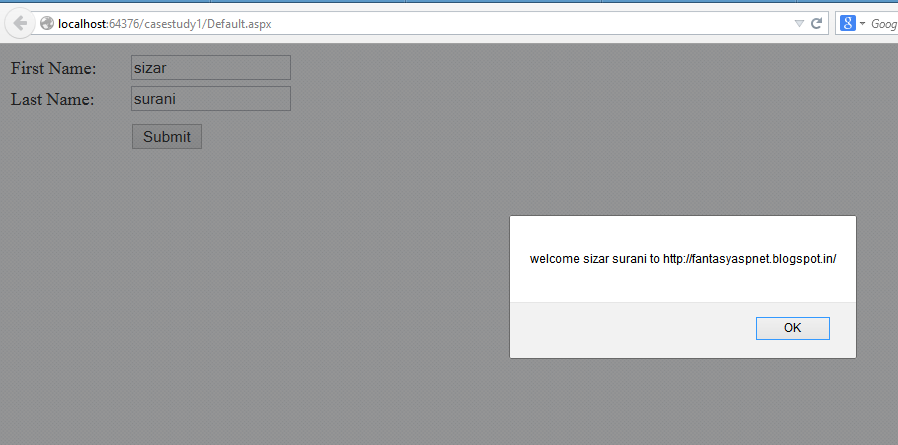
Demo:


How to Print DIV Content with CSS using jQuery Print Plugin in JavaScript jQuery

How to Print DIV Content with CSS using jQuery Print Plugin in JavaScript jQuery

.Aspx File
 
 <html data-ng-app="myApp">
<head>
    <title>demo</title>
     <script type="text/javascript" src="http://code.jquery.com/jquery-1.8.2.js"></script>
<script type="text/javascript" src="https://googledrive.com/host/0Bw4NrxH2nTVqbmVOVkdOenhDU0U"></script>
<script type="text/javascript">
    $(function () {
        $("#hrefPrint").click(function () {
            $("#printdiv").print();
            return (false);
        });
    });
</script>
<style type="text/css">
body {
font-family: verdana ;
font-size: 14px ;
}
h1 {
font-size: 180% ;
}
h2 {
border-bottom: 1px solid #999999 ;
}
.printable {
border: 1px dotted #CCCCCC ;
padding: 10px 10px 10px 10px ;
}
img {
background-color: #E0E0E0 ;
border: 1px solid #666666 ;
padding: 5px 5px 5px 5px ;
}
a {
color: red ;
font-weight:bold;
}
</style>
</head>
<body>
    <div>
        <div id="printdiv" class="printable">
<h2>
fantasyaspnet.blogspot.in
&nbsp;&nbsp;&nbsp;<a href="#" id="hrefPrint">Print DIV</a>
</h2>
<p>
Welcome to fantasyaspnet.blogspot.in. It will provide many articles relating asp.net, c#, sql server, jquery, json etc...
</p>
<p>
</p>
</div>
    </div>
</body>
</html>

Demo:

fantasyaspnet.blogspot.in    Print DIV

Welcome to fantasyaspnet.blogspot.in. It will provide many articles relating asp.net, c#, sql server, jquery, json etc...


Friday, 14 March 2014

How to Convert 12 Hour AM/PM Time to 24 Hours Time Format JavaScript

How to Convert 12 Hour AM/PM Time to 24 Hours Time Format JavaScript
 
 <html xmlns="http://www.w3.org/1999/xhtml">
<head>
<title>JavaScript Convert AM/PM to 24 Hours Time</title>
<script type="text/javascript">
function Converttimeformat() {
// var time = $("#starttime").val();
var time = document.getElementById('txttime').value;
var hrs = Number(time.match(/^(\d+)/)[1]);
var mnts = Number(time.match(/:(\d+)/)[1]);
var format = time.match(/\s(.*)$/)[1];
if (format == "PM" && hrs < 12) hrs = hrs + 12;
if (format == "AM" && hrs == 12) hrs = hrs - 12;
var hours = hrs.toString();
var minutes = mnts.toString();
if (hrs < 10) hours = "0" + hours;
if (mnts < 10) minutes = "0" + minutes;
alert(hours + ":" + minutes);
}
</script>
</head>
<body>
<div>
<table>
<tr>
<td><b>Enter Time:</b></td>
<td><input type="text" id="txttime" value="10:00 PM" /></td>
</tr>
<tr>
<td></td>
<td><input type="button" id="btnConvert" value="Convert to AM/PM" onclick="Converttimeformat()" /></td>
</tr>
</table>
</div>
</body>
</html>

Enter Time:


How to Check Given Date Greater than Current Date or Today Date JavaScript JQuery

How to Check Given Date Greater than Current Date or Today Date JavaScript JQuery 
 
 <html xmlns="http://www.w3.org/1999/xhtml">
<head>
<title>How to Check Given Date Greater than Current Date or Today Date JavaScript JQuery </title>
<script type="text/javascript" src="http://code.jquery.com/jquery-1.8.2.js"></script>
<script type="text/javascript">
    $(function () {
        $('#btnConvert').click(function () {
            var param1 = new Date();
            var ddate = $('#txtdate').val();
            var time = $('#txttime').val();
            var hours = Number(time.match(/^(\d+)/)[1]);
            var minutes = Number(time.match(/:(\d+)/)[1]);
            var format = time.match(/\s(.*)$/)[1];
            if (format == "PM" && hours < 12) hours = hours + 12;
            if (format == "AM" && hours == 12) hours = hours - 12;
            var sHours = hours.toString();
            var sMinutes = minutes.toString();
            if (hours < 10) sHours = "0" + sHours;
            if (minutes < 10) sMinutes = "0" + sMinutes;
            ddate = ddate + " " + sHours + ":" + sMinutes + ":00";
            var date1 = new Date(ddate);
            var date2 = new Date();
            if (date1 < date2) {
                alert('Please Enter Date time Greater than Current Date time');
                $('#txtdate').focus();
                return false;
            }
        })
    })
</script>
</head>
<body>
<table>
<tr>
<td><b>Enter Date:</b></td>
<td><input type="text" id="txtdate" value="08/27/2013" /></td>
</tr>
<tr>
<td><b>Enter Time:</b></td>
<td><input type="text" id="txttime" value="10:00 PM" /></td>
</tr>
<tr>
<td></td>
<td><input type="button" id="btnConvert" value="Convert to AM/PM" /></td>
</tr>
</table>
</body>
</html> <html xmlns="http://www.w3.org/1999/xhtml">
<head>
<title>jQuery Check Given Date Time Greater than Current Date time in JavaScript</title>
<script type="text/javascript" src="http://code.jquery.com/jquery-1.8.2.js"></script>
<script type="text/javascript">
    $(function () {
        $('#btnConvert').click(function () {
            var param1 = new Date();
            var ddate = $('#txtdate').val();
            var time = $('#txttime').val();
            var hours = Number(time.match(/^(\d+)/)[1]);
            var minutes = Number(time.match(/:(\d+)/)[1]);
            var format = time.match(/\s(.*)$/)[1];
            if (format == "PM" && hours < 12) hours = hours + 12;
            if (format == "AM" && hours == 12) hours = hours - 12;
            var sHours = hours.toString();
            var sMinutes = minutes.toString();
            if (hours < 10) sHours = "0" + sHours;
            if (minutes < 10) sMinutes = "0" + sMinutes;
            ddate = ddate + " " + sHours + ":" + sMinutes + ":00";
            var date1 = new Date(ddate);
            var date2 = new Date();
            if (date1 < date2) {
                alert('Please Enter Date time Greater than Current Date time');
                $('#txtdate').focus();
                return false;
            }
        })
    })
</script>
</head>
<body>
<table>
<tr>
<td><b>Enter Date:</b></td>
<td><input type="text" id="Text1" value="03/15/2013" /></td>
</tr>
<tr>
<td><b>Enter Time:</b></td>
<td><input type="text" id="Text2" value="10:00 PM" /></td>
</tr>
<tr>
<td></td>
<td><input type="button" id="Button1" value="Convert to AM/PM" /></td>
</tr>
</table>
</body>
</html

Enter Date:
Enter Time:


Friday, 28 February 2014

How to setTimeout Function Example JavaScript c#

How to setTimeout Function Example JavaScript c#

Method 1:
 
 setTimeout(yourfunction(), timeinterval);

function yourfunction() {
// your code here
}

Method 2:

 setTimeout(function(){// your code here
}, timeinterval);

Sample Code:

 <html xmlns="http://www.w3.org/1999/xhtml">
<head>
<title>JavaScript display current time on webpage</title>
<script type="text/javascript">
    function ShowCurrentTime() {
        var dt = new Date();
        document.getElementById("lblTime").innerHTML = dt.toLocaleTimeString();
        setTimeout("ShowCurrentTime()", 1000); // Here 1000(milliseconds) means one 1 Sec
    }
</script>
</head>
<body onload="ShowCurrentTime()">
<div>
JavaScript Display current time second by second:
<label id="lblTime" style=" font-weight:bold"></label>
</div>
</body>
</html>

Live Demo:

JavaScript display current time on webpage
JavaScript Display current time second by second:


Friday, 14 February 2014

How to Validate User Registration Form Validation in JavaScript Source Code c#

How to Validate User Registration Form Validation in JavaScript Source Code c#


<html xmlns="http://www.w3.org/1999/xhtml">
<head id="Head1" runat="server">
    <title>Registration Form Validation in JavaScript Source Code</title>
    <script language="javascript" type="text/javascript"> function validate() { var summary = ""; summary += isvaliduser(); summary += isvalidFirstname(); summary += isvalidLocation(); if (summary != "") { alert(summary); return false; } else { return true; } } function isvaliduser() { var uid; var temp = document.getElementById("<%=txtuser.ClientID %>"); uid = temp.value; if (uid == "") { return ("Please Enter UserName" + "\n"); } else { return ""; } } function isvalidFirstname() { var uid; var temp = document.getElementById("<%=txtfname.ClientID %>"); uid = temp.value; if (uid == "") { return ("Please enter firstname" + "\n"); } else { return ""; } } function isvalidLocation() { var uid; var temp = document.getElementById("<%=txtlocation.ClientID %>"); uid = temp.value; if (uid == "") { return ("Please enter Location" + "\n"); } else { return ""; } } </script>
</head>
<body>
    <form id="form1" runat="server">
        <table align="center">
            <tr>
                <td>UserName</td>
                <td>
                    <asp:textbox id="txtuser" runat="server" />
                </td>
            </tr>
            <tr>
                <td>First Name</td>
                <td>
                    <asp:textbox id="txtfname" runat="server" />
                </td>
            </tr>
            <tr>
                <td>Location</td>
                <td>
                    <asp:textbox id="txtlocation" runat="server" />
                </td>
            </tr>
            <tr>
                <td></td>
                <td>
                    <asp:button id="btnsubmit" runat="server" text="Save" onclientclick="javascript:validate()" />
                </td>
            </tr>
        </table>
    </form>
</body>
</html>


UserName First Name Location


Download