Pages

Showing posts with label jQuery. Show all posts

Friday, 12 September 2014

How to Get Data From Wikipedia Using API and jQuery in C#

How to Get Data From Wikipedia Using API and jQuery in C#
                                                                 
.Aspx File
 
<%@ Page Language="VB" AutoEventWireup="false" CodeFile="WikirRference.aspx.vb" Inherits="Default2" %>

<!DOCTYPE html PUBLIC "-//W3C//DTD XHTML 1.0 Transitional//EN" "http://www.w3.org/TR/xhtml1/DTD/xhtml1-transitional.dtd">

<html xmlns="http://www.w3.org/1999/xhtml">
<head runat="server">
    <script src="https://googledrive.com/host/0Bw4NrxH2nTVqMnliTHpSY0U4ZE0" type="text/javascript"></script>

    <script src="https://googledrive.com/host/0Bw4NrxH2nTVqYndKU2p0Z2s3M1E" type="text/javascript"></script>

    <script src="https://googledrive.com/host/0Bw4NrxH2nTVqX3VZazJtMmxSNW8" type="text/javascript"></script>
    <title></title>
    <script type="text/javascript">
        $(document).ready(function () {
        });
        function searchdata() {

            var q = $("#searchterm").val();
            $.getJSON("http://en.wikipedia.org/w/api.php?callback=?",
              {
                  srsearch: q,
                  action: "query",
                  list: "search",
                  format: "json"

              },
              function (data) {
                  $("#results").empty();
                  $("#results").append("Results for <b>" + q + "</b> </br>");
                  $("#results").append("<div>&nbsp;</div>");
                  $.each(data.query.search, function (i, item) {
                      $("#results").append("<div><a href='http://en.wikipedia.org/wiki/" + encodeURIComponent(item.title) + "'>" + item.title + "</a> : " + item.snippet + "</div>");
                  });
              });


        }

    </script>
</head>
<body>
    <form id="form1" runat="server">
        <div style="border: 2px solid #a1a1a1; padding: 10px 40px; background: #dddddd; width: 300px; border-radius: 25px; height: 60px; text-align: left;">
            <b>Wikipedia API Search Using jQuery By http://fantasyaspnet.blogspot.in/</b><br />
            (This Wikipedia API will give the search results and references more than one.)
        </div>
        <div style="padding-left: 75px; padding-top: 15px;">
            <input id="searchterm" type="text" />
            <input id="search" type="button" value="Search" onclick="searchdata();" />
        </div>
        <div>&nbsp;</div>
        <div id="results" style="width: 300px; box-shadow: 10px 10px 5px #888888;">
        </div>
    </form>
</body>
</html>

Live Demo

Wikipedia API Search Using jQuery By http://fantasyaspnet.blogspot.in/
(This Wikipedia API will give the search results and references more than one.)


Thursday, 11 September 2014

How to Call C# Method/Function Using jQuery Ajax

How to Call C# Method/Function Using jQuery Ajax
                                                                 
pageUrl = '<%= ResolveUrl("~/Default.aspx/jqueryAjaxCall") %>';
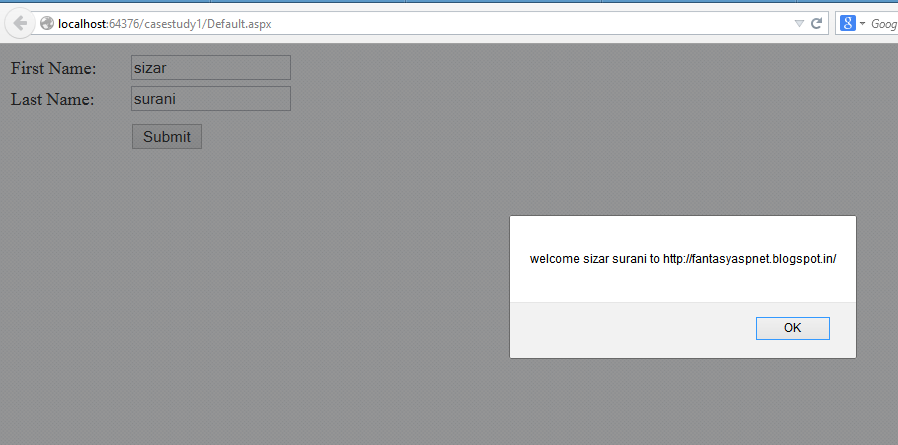
Default.aspx =  Page Name and jqueryAjaxCall= c# method This is static web method.
firstName = $("#<%= txtFirstName.ClientID %>").val(); First Name parameters
lastName = $("#<%= txtLastName.ClientID %>").val();  Second Name parameters
parameter = { "firstName": firstName, "lastName": lastName }
Json format here first name and last name will we pass as the parameters to my jqueryAjaxCall method

.Aspx File
 
 <%@ Page Language="C#" AutoEventWireup="true" CodeFile="Default.aspx.cs" Inherits="_Default" %>

<!DOCTYPE html PUBLIC "-//W3C//DTD XHTML 1.0 Transitional//EN" "http://www.w3.org/TR/xhtml1/DTD/xhtml1-transitional.dtd">
<html xmlns="http://www.w3.org/1999/xhtml">
<head runat="server">
    <title>Call C# method/function using JQuery Ajax</title>

    <script src="Script/jquery-1.11.0.min.js" type="text/javascript"></script>

    <script type="text/javascript" language="javascript">

        function JqueryAjaxCall() {
            var pageUrl = '<%= ResolveUrl("~/Default.aspx/jqueryAjaxCall") %>';
            var firstName = $("#<%= txtFirstName.ClientID %>").val();
            var lastName = $("#<%= txtLastName.ClientID %>").val();
            var parameter = { "firstName": firstName, "lastName": lastName }

            $.ajax({
                type: 'POST',
                url: pageUrl,
                data: JSON.stringify(parameter),
                contentType: 'application/json; charset=utf-8',
                dataType: 'json',
                success: function(data) {
                    onSuccess(data);
                },
                error: function(data, success, error) {
                    alert("Error : " + error);
                }
            });

            return false;
        }

        function onSuccess(data) {
            alert("welcome " + data.d + " to http://fantasyaspnet.blogspot.in/");
        }
  
    </script>

</head>
<body>
    <form id="form1" runat="server">
    <div>
        <table cellpadding="3" cellspacing="0" style="width: 25%;">
            <tr>
                <td>
                    First Name:
                </td>
                <td>
                    <asp:TextBox ID="txtFirstName" runat="server"></asp:TextBox>
                </td>
            </tr>
            <tr>
                <td>
                    Last Name:
                </td>
                <td>
                    <asp:TextBox ID="txtLastName" runat="server"></asp:TextBox>
                </td>
            </tr>
            <tr>
                <td>
                </td>
                <td>
                </td>
            </tr>
            <tr>
                <td>
                </td>
                <td>
                    <asp:Button ID="btnSubmit" runat="server" OnClientClick="return JqueryAjaxCall();"
                        Text="Submit" />
                </td>
            </tr>
        </table>
    </div>
    </form>
</body>
</html>

C#

using System;
using System.Collections.Generic;
using System.Linq;
using System.Web;
using System.Web.UI;
using System.Web.UI.WebControls;
using System.Web.Services;

public partial class _Default : System.Web.UI.Page
{
    protected void Page_Load(object sender, EventArgs e)
    {

    }

    [WebMethod]
    public static string jqueryAjaxCall(string firstName, string lastName)
    {
        return firstName + " " + lastName;
    }
}

Demo:


How to Print DIV Content with CSS using jQuery Print Plugin in JavaScript jQuery

How to Print DIV Content with CSS using jQuery Print Plugin in JavaScript jQuery

.Aspx File
 
 <html data-ng-app="myApp">
<head>
    <title>demo</title>
     <script type="text/javascript" src="http://code.jquery.com/jquery-1.8.2.js"></script>
<script type="text/javascript" src="https://googledrive.com/host/0Bw4NrxH2nTVqbmVOVkdOenhDU0U"></script>
<script type="text/javascript">
    $(function () {
        $("#hrefPrint").click(function () {
            $("#printdiv").print();
            return (false);
        });
    });
</script>
<style type="text/css">
body {
font-family: verdana ;
font-size: 14px ;
}
h1 {
font-size: 180% ;
}
h2 {
border-bottom: 1px solid #999999 ;
}
.printable {
border: 1px dotted #CCCCCC ;
padding: 10px 10px 10px 10px ;
}
img {
background-color: #E0E0E0 ;
border: 1px solid #666666 ;
padding: 5px 5px 5px 5px ;
}
a {
color: red ;
font-weight:bold;
}
</style>
</head>
<body>
    <div>
        <div id="printdiv" class="printable">
<h2>
fantasyaspnet.blogspot.in
&nbsp;&nbsp;&nbsp;<a href="#" id="hrefPrint">Print DIV</a>
</h2>
<p>
Welcome to fantasyaspnet.blogspot.in. It will provide many articles relating asp.net, c#, sql server, jquery, json etc...
</p>
<p>
</p>
</div>
    </div>
</body>
</html>

Demo:

fantasyaspnet.blogspot.in    Print DIV

Welcome to fantasyaspnet.blogspot.in. It will provide many articles relating asp.net, c#, sql server, jquery, json etc...


Friday, 14 March 2014

How to Convert AM PM Time to 24 Hour Time jQuery

How to Convert AM PM Time to 24 Hour Time jQuery
 
<html xmlns="http://www.w3.org/1999/xhtml">
<head>
    <title>jQuery Convert AM / PM time to 24 hours time</title>
    <script type="text/javascript" src="http://code.jquery.com/jquery-1.8.2.js"></script>
    <script type="text/javascript">
        $(function () {
            $('#btnConvert').click(function () {
                var time = $("#txttime").val();
                var hrs = Number(time.match(/^(\d+)/)[1]);
                var mnts = Number(time.match(/:(\d+)/)[1]);
                var format = time.match(/\s(.*)$/)[1];
                if (format == "PM" && hrs < 12) hrs = hrs + 12;
                if (format == "AM" && hrs == 12) hrs = hrs - 12;
                var hours = hrs.toString();
                var minutes = mnts.toString();
                if (hrs < 10) hours = "0" + hours;
                if (mnts < 10) minutes = "0" + minutes;
                alert(hours + ":" + minutes);
            })
        })
    </script>
</head>
<body>
    <table>
        <tr>
            <td><b>Enter Time:</b></td>
            <td>
                <input type="text" id="txttime" value="12:00 PM" /></td>
        </tr>
        <tr>
            <td></td>
            <td>
                <input type="button" id="btnConvert" value="Convert to AM/PM" /></td>
        </tr>
    </table>
</body>
</html>

Enter Time:


How to Check Given Date Greater than Current Date or Today Date JavaScript JQuery

How to Check Given Date Greater than Current Date or Today Date JavaScript JQuery 
 
 <html xmlns="http://www.w3.org/1999/xhtml">
<head>
<title>How to Check Given Date Greater than Current Date or Today Date JavaScript JQuery </title>
<script type="text/javascript" src="http://code.jquery.com/jquery-1.8.2.js"></script>
<script type="text/javascript">
    $(function () {
        $('#btnConvert').click(function () {
            var param1 = new Date();
            var ddate = $('#txtdate').val();
            var time = $('#txttime').val();
            var hours = Number(time.match(/^(\d+)/)[1]);
            var minutes = Number(time.match(/:(\d+)/)[1]);
            var format = time.match(/\s(.*)$/)[1];
            if (format == "PM" && hours < 12) hours = hours + 12;
            if (format == "AM" && hours == 12) hours = hours - 12;
            var sHours = hours.toString();
            var sMinutes = minutes.toString();
            if (hours < 10) sHours = "0" + sHours;
            if (minutes < 10) sMinutes = "0" + sMinutes;
            ddate = ddate + " " + sHours + ":" + sMinutes + ":00";
            var date1 = new Date(ddate);
            var date2 = new Date();
            if (date1 < date2) {
                alert('Please Enter Date time Greater than Current Date time');
                $('#txtdate').focus();
                return false;
            }
        })
    })
</script>
</head>
<body>
<table>
<tr>
<td><b>Enter Date:</b></td>
<td><input type="text" id="txtdate" value="08/27/2013" /></td>
</tr>
<tr>
<td><b>Enter Time:</b></td>
<td><input type="text" id="txttime" value="10:00 PM" /></td>
</tr>
<tr>
<td></td>
<td><input type="button" id="btnConvert" value="Convert to AM/PM" /></td>
</tr>
</table>
</body>
</html> <html xmlns="http://www.w3.org/1999/xhtml">
<head>
<title>jQuery Check Given Date Time Greater than Current Date time in JavaScript</title>
<script type="text/javascript" src="http://code.jquery.com/jquery-1.8.2.js"></script>
<script type="text/javascript">
    $(function () {
        $('#btnConvert').click(function () {
            var param1 = new Date();
            var ddate = $('#txtdate').val();
            var time = $('#txttime').val();
            var hours = Number(time.match(/^(\d+)/)[1]);
            var minutes = Number(time.match(/:(\d+)/)[1]);
            var format = time.match(/\s(.*)$/)[1];
            if (format == "PM" && hours < 12) hours = hours + 12;
            if (format == "AM" && hours == 12) hours = hours - 12;
            var sHours = hours.toString();
            var sMinutes = minutes.toString();
            if (hours < 10) sHours = "0" + sHours;
            if (minutes < 10) sMinutes = "0" + sMinutes;
            ddate = ddate + " " + sHours + ":" + sMinutes + ":00";
            var date1 = new Date(ddate);
            var date2 = new Date();
            if (date1 < date2) {
                alert('Please Enter Date time Greater than Current Date time');
                $('#txtdate').focus();
                return false;
            }
        })
    })
</script>
</head>
<body>
<table>
<tr>
<td><b>Enter Date:</b></td>
<td><input type="text" id="Text1" value="03/15/2013" /></td>
</tr>
<tr>
<td><b>Enter Time:</b></td>
<td><input type="text" id="Text2" value="10:00 PM" /></td>
</tr>
<tr>
<td></td>
<td><input type="button" id="Button1" value="Convert to AM/PM" /></td>
</tr>
</table>
</body>
</html

Enter Date:
Enter Time:


Saturday, 1 March 2014

How To Hide DIV Elements After 5 Seconds or Some Time Delay Using jQuery in C#

How To Hide DIV Elements After 5 Seconds or Some Time Delay Using jQuery in C#
 <html xmlns="http://www.w3.org/1999/xhtml">
<head>
<title>jQuery Hide DIV Elements after 10 seconds</title>
<script type="text/javascript" src="http://code.jquery.com/jquery-1.8.2.js"></script>
<script type="text/javascript">
    $(function () {
        setTimeout(function () { $("#testdiv").fadeOut(1500); }, 5000)
        $('#btnclick').click(function () {
            $('#testdiv').show();
            setTimeout(function () { $("#testdiv").fadeOut(1500); }, 5000)
        })
    })
</script>
<style type="text/css">
.content
{
border: 2px solid Red;
color: #008000;
padding: 10px;
width: 400px;
font-family:Calibri;
font-size:16pt
}
</style>
</head>
<body>
<input type="button" id="btnclick" value="Show DIV" />
<div class="content" id="testdiv" class="">
Hi, Welcome to http://fantasyaspnet.blogspot.com
It will disappear in 5 seconds!
</div>
</body>
</html>


Hi, Welcome to http://fantasyaspnet.blogspot.com It will disappear in 5 seconds!

Thursday, 27 February 2014

How to Get Query String Parameter Values with Spaces in C#

How to Get Query String Parameter Values with Spaces in C#

we have to use decodeURIComponent JavaScript function in our code.

 <script type="text/javascript">
     $(function () {
         var str = decodeURIComponent('Welcome%20To%20http%3A%2f%2ffantasyaspnet.blogspot.in%2f')
         alert(str);
     })
</script>

Example:

 <html xmlns="http://www.w3.org/1999/xhtml">
<head>
<title>How to Get Query String Parameter Values with Spaces in C#</title>
<script type="text/javascript" src="http://code.jquery.com/jquery-1.8.2.js"></script>
<script type="text/javascript">
    $(function () {
        var name = GetParameterValues('username');
        var id = GetParameterValues('name');
        $('#spn_UserName').html('<strong>' + name + '</strong>');
        $('#spn_UserId').html('<strong>' + id + '</strong>');
    });
    function GetParameterValues(param) {
        var url = window.location.href.slice(window.location.href.indexOf('?') + 1).split('&');
        for (var i = 0; i < url.length; i++) {
            var urlparam = url[i].split('=');
            if (urlparam[0] == param) {
                return decodeURIComponent(urlparam[1]);
            }
        }
    }
</script>
</head>
<body>
<form id="form1" runat="server">
<div>
<p>UserName: <span id="spn_UserName"></span></p>
<p>Name: <span id="spn_UserId"></span></p>
</div>
</form>
</body>
</html>

Demo: 


Wednesday, 26 February 2014

How to use Wiki Plugin to Show Wikipedia Description in Tooltips Using Jquery

How to use Wiki Plugin to Show Wikipedia Description in Tooltips Using Jquery

.Aspx Page 
 
 <html xmlns="http://www.w3.org/1999/xhtml">
<head>
<title>jQuery plugin to show wikipedia description in tooltips</title>
<link href="wikiUp.css" rel="stylesheet" type="text/css" />
<script type="text/javascript" src="http://code.jquery.com/jquery-1.8.2.js"></script>
<script src="wikiUp.js" type="text/javascript"></script>
</head>
<body>
<data data-wiki="Apple Inc."><b>Apple</b></data> was founded by <data data-wiki="Steve Jobs"><b>Steve Jobs</b></data>.
<data data-wiki="Madrid" data-lang="es"><b>Madrid</b></data> es la capital de España.
</body>
</html>

We have to add files “wikiUp.css” and “wikiUp.js” in our aspx file.You can download from hear
Demo:


How to Select Deselect All Check boxes with Name Using jquery in c#

How to Select Deselect All Check boxes with Name Using jquery in c#
 
<html xmlns="http://www.w3.org/1999/xhtml">
<head>
<title>jQuery Select Deselect all Checkboxes</title>
<script src="http://code.jquery.com/jquery-1.8.2.js" type="text/javascript"></script>
<script type="text/javascript">
    $(function () {
        $('input[name="chkUser"]').click(function () {
            if ($('input[name="chkUser"]').length == $('input[name="chkUser"]:checked').length) {
                $('input:checkbox[name="chkAll"]').attr("checked", "checked");
            }
            else {
                $('input:checkbox[name="chkAll"]').removeAttr("checked");
            }
        });
        $('input:checkbox[name="chkAll"]').click(function () {
            var slvals = []
            if ($(this).is(':checked')) {
                $('input[name="chkUser"]').attr("checked", true);
            }
            else {
                $('input[name="chkUser"]').attr("checked", false);
                slvals = null;
            }
        });
    })
</script>
<style type="text/css">
li
{
list-style-type:none;
}
</style></head>
<body>
<ul>
<li><label><input type="checkbox" name="chkAll" value="All"/>
Select All
</label></li>
<li><label><input type="checkbox" name="chkUser" value="3930"/>sizar</label></li>
<li><label><input type="checkbox" name="chkUser" value="4049"/>sahil</label></li>
<li><label><input type="checkbox" name="chkUser" value="4076"/>salim</label></li>
<li><label><input type="checkbox" name="chkUser" value="4086"/>rameez</label></li>
<li><label><input type="checkbox" name="chkUser" value="4087"/>nasir</label></li>
<li><label><input type="checkbox" name="chkUser" value="4116"/>karim</label></li>

</ul>
</body>
</html>

Demo:


How to Check Unchecked All Check boxes with Header in using jQuery c#

How to Check Unchecked All Check boxes with Header in using jQuery c#

.Aspx:
 
<html xmlns="http://www.w3.org/1999/xhtml">
<head>
<title>jQuery Check uncheck all Checkboxes</title>
<script src="http://code.jquery.com/jquery-1.8.2.js" type="text/javascript"></script>
<script type="text/javascript">
    $(function () {
        $('input[name="chkUser"]').click(function () {
            if ($('input[name="chkUser"]').length == $('input[name="chkUser"]:checked').length) {
                $('input:checkbox[name="chkAll"]').attr("checked", "checked");
            }
            else {
                $('input:checkbox[name="chkAll"]').removeAttr("checked");
            }
        });
        $('input:checkbox[name="chkAll"]').click(function () {
            var slvals = []
            if ($(this).is(':checked')) {
                $('input[name="chkUser"]').attr("checked", true);
            }
            else {
                $('input[name="chkUser"]').attr("checked", false);
                slvals = null;
            }
        });
    })
</script>
<style type="text/css">
li
{
list-style-type:none;
}
</style></head>
<body>
<ul>
<li><label><input type="checkbox" name="chkAll" value="All"/>
Select All
</label></li>
<li><label><input type="checkbox" name="chkUser" value="3930"/>sizar</label></li>
<li><label><input type="checkbox" name="chkUser" value="4049"/>sahil</label></li>
<li><label><input type="checkbox" name="chkUser" value="4076"/>salim</label></li>
<li><label><input type="checkbox" name="chkUser" value="4086"/>rameez</label></li>
<li><label><input type="checkbox" name="chkUser" value="4087"/>nasir</label></li>
<li><label><input type="checkbox" name="chkUser" value="4116"/>karim</label></li>
</ul>
</body>
</html>

Demo:


Friday, 14 February 2014

How To Create Cascading Dropdown List in Asp.net with Example Using Jquery

How To Create Cascading Dropdown List in Asp.net with Example Using Jquery

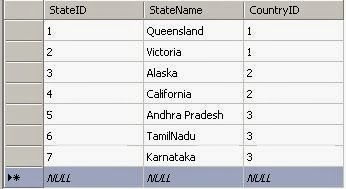
Country Table


State Table


Region Table


.Aspx Page
 

<html xmlns="http://www.w3.org/1999/xhtml">
<head>
    <title>jQuery Cascading Dropdown Example</title>
    <script type="text/javascript" src="http://code.jquery.com/jquery-1.8.2.js"></script>
</head>
<body>
    <form id="form1" runat="server">
        <div>
            <table>
                <tr>
                    <td>Country</td>
                    <td>
                        <asp:dropdownlist id="ddlcountries" runat="server"></asp:dropdownlist>
                    </td>
                </tr>
                <tr>
                    <td>State</td>
                    <td>
                        <asp:dropdownlist id="ddlstate" runat="server"></asp:dropdownlist>
                    </td>
                </tr>
                <tr>
                    <td>Region</td>
                    <td>
                        <asp:dropdownlist id="ddlcity" runat="server"></asp:dropdownlist>
                    </td>
                </tr>
            </table>
        </div>
    </form>
    <script type="text/javascript">
        $(function () {
            $('#<%=ddlstate.ClientID %>').attr('disabled', 'disabled');
            $('#<%=ddlcity.ClientID %>').attr('disabled', 'disabled');
            $('#<%=ddlstate.ClientID %>').append('<option selected="selected" value="0">Select State</option>');
            $('#<%=ddlcity.ClientID %>').empty().append('<option selected="selected" value="0">Select Region</option>');
            $('#<%=ddlcountries.ClientID %>').change(function () {
                var country = $('#<%=ddlcountries.ClientID%>').val()
                $('#<%=ddlstate.ClientID %>').removeAttr("disabled");
                $('#<%=ddlcity.ClientID %>').empty().append('<option selected="selected" value="0">Select Region</option>');
                $('#<%=ddlcity.ClientID %>').attr('disabled', 'disabled');
                $.ajax({
                    type: "POST",
                    url: "jQueryCascadingDropdownExample.aspx/BindStates",
                    data: "{'country':'" + country + "'}",
                    contentType: "application/json; charset=utf-8",
                    dataType: "json",
                    success: function (msg) {
                        var j = jQuery.parseJSON(msg.d);
                        var options;
                        for (var i = 0; i < j.length; i++) {
                            options += '<option value="' + j[i].optionValue + '">' + j[i].optionDisplay + '</option>'
                        }
                        $('#<%=ddlstate.ClientID %>').html(options)
                    },
                    error: function (data) {
                        alert('Something Went Wrong')
                    }
                });
            });
            $('#<%=ddlstate.ClientID %>').change(function () {
                var stateid = $('#<%=ddlstate.ClientID%>').val()
                $('#<%=ddlcity.ClientID %>').removeAttr("disabled");
                $.ajax({
                    type: "POST",
                    url: "jQueryCascadingDropdownExample.aspx/BindRegion",
                    data: "{'state':'" + stateid + "'}",
                    contentType: "application/json; charset=utf-8",
                    dataType: "json",
                    success: function (msg) {
                        var j = jQuery.parseJSON(msg.d);
                        var options;
                        for (var i = 0; i < j.length; i++) {
                            options += '<option value="' + j[i].optionValue + '">' + j[i].optionDisplay + '</option>'
                        }
                        $('#<%=ddlcity.ClientID %>').html(options)
                    },
                    error: function (data) {
                        alert('Something Went Wrong')
                    }
                });
            })
        })
    </script>
</body>
</html>


C# Code


 using System;
using System.Data;
using System.Data.SqlClient;
using System.IO;
using System.Web.Services;
using System.Web.UI.WebControls;
 public static string strcon = "Data Source=SureshDasari;Initial Catalog=MySampleDB;Integrated Security=true";
protected void Page_Load(object sender, EventArgs e)
{
if(!IsPostBack)
{
BindCountries();
}
}
public void BindCountries()
{
String strQuery = "select CountryID,CountryName from Country";
using (SqlConnection con = new SqlConnection(strcon))
{
using (SqlCommand cmd = new SqlCommand())
{
cmd.CommandType = CommandType.Text;
cmd.CommandText = strQuery;
cmd.Connection = con;
con.Open();
ddlcountries.DataSource = cmd.ExecuteReader();
ddlcountries.DataTextField = "CountryName";
ddlcountries.DataValueField = "CountryID";
ddlcountries.DataBind();
ddlcountries.Items.Insert(0, new ListItem("Select Country", "0"));
con.Close();
}
}
}
[WebMethod]
public static string BindStates(string country)
{
StringWriter builder = new StringWriter();
String strQuery = "select StateID,StateName from State where CountryID=@CountryID";
DataSet ds = new DataSet();
using (SqlConnection con = new SqlConnection(strcon))
{
using (SqlCommand cmd = new SqlCommand())
{
cmd.CommandType = CommandType.Text;
cmd.CommandText = strQuery;
cmd.Parameters.AddWithValue("@countryid", country);
cmd.Connection = con;
con.Open();
SqlDataAdapter da = new SqlDataAdapter(cmd);
da.Fill(ds);
con.Close();
}
}
DataTable dt = ds.Tables[0];
builder.WriteLine("[");
if (dt.Rows.Count > 0)
{
builder.WriteLine("{\"optionDisplay\":\"Select State\",");
builder.WriteLine("\"optionValue\":\"0\"},");
for (int i = 0; i <= dt.Rows.Count - 1; i++)
{
builder.WriteLine("{\"optionDisplay\":\"" + dt.Rows[i]["StateName"] + "\",");
builder.WriteLine("\"optionValue\":\"" + dt.Rows[i]["StateID"]+ "\"},");
}
}
else
{
builder.WriteLine("{\"optionDisplay\":\"Select State\",");
builder.WriteLine("\"optionValue\":\"0\"},");
}
string returnjson = builder.ToString().Substring(0, builder.ToString().Length - 3);
returnjson = returnjson + "]";
return returnjson.Replace("\r", "").Replace("\n", "");
}

[WebMethod]
public static string BindRegion(string state)
{
StringWriter builder = new StringWriter();
String strQuery = "select RegionID, RegionName from Region where StateID=@StateID";
DataSet ds = new DataSet();
using (SqlConnection con = new SqlConnection(strcon))
{
using (SqlCommand cmd = new SqlCommand())
{
cmd.CommandType = CommandType.Text;
cmd.CommandText = strQuery;
cmd.Parameters.AddWithValue("@StateID", state);
cmd.Connection = con;
con.Open();
SqlDataAdapter da = new SqlDataAdapter(cmd);
da.Fill(ds);
con.Close();
}
}
DataTable dt = ds.Tables[0];
builder.WriteLine("[");
if (dt.Rows.Count > 0)
{
builder.WriteLine("{\"optionDisplay\":\"Select Region\",");
builder.WriteLine("\"optionValue\":\"0\"},");
for (int i = 0; i <= dt.Rows.Count - 1; i++)
{
builder.WriteLine("{\"optionDisplay\":\"" + dt.Rows[i]["RegionName"] + "\",");
builder.WriteLine("\"optionValue\":\"" + dt.Rows[i]["RegionID"] + "\"},");
}
}
else
{
builder.WriteLine("{\"optionDisplay\":\"Select Region\",");
builder.WriteLine("\"optionValue\":\"0\"},");
}
string returnjson = builder.ToString().Substring(0, builder.ToString().Length - 3);
returnjson = returnjson + "]";
return returnjson.Replace("\r", "").Replace("\n", "");
}


VB Code


Imports System.Data
Imports System.Data.SqlClient
Imports System.IO
Imports System.Web.Services
Imports System.Web.UI.WebControls

Partial Class VBCode
Inherits System.Web.UI.Page
Public Shared strcon As String = "Data Source=SureshDasari;Initial Catalog=MySampleDB;Integrated Security=true"
Protected Sub Page_Load(ByVal sender As Object, ByVal e As EventArgs) Handles Me.Load

If Not IsPostBack Then
BindCountries()
End If
End Sub
Public Sub BindCountries()
Dim strQuery As [String] = "select CountryID,CountryName from Country"
Using con As New SqlConnection(strcon)
Using cmd As New SqlCommand()
cmd.CommandType = CommandType.Text
cmd.CommandText = strQuery
cmd.Connection = con
con.Open()
ddlcountries.DataSource = cmd.ExecuteReader()
ddlcountries.DataTextField = "CountryName"
ddlcountries.DataValueField = "CountryID"
ddlcountries.DataBind()
ddlcountries.Items.Insert(0, New ListItem("Select Country", "0"))
con.Close()
End Using
End Using
End Sub
<WebMethod()> _
Public Shared Function BindStates(ByVal country As String) As String
Dim builder As New StringWriter()
Dim strQuery As [String] = "select StateID,StateName from State where CountryID=@CountryID"
Dim ds As New DataSet()
Using con As New SqlConnection(strcon)
Using cmd As New SqlCommand()
cmd.CommandType = CommandType.Text
cmd.CommandText = strQuery
cmd.Parameters.AddWithValue("@countryid", country)
cmd.Connection = con
con.Open()
Dim da As New SqlDataAdapter(cmd)
da.Fill(ds)
con.Close()
End Using
End Using
Dim dt As DataTable = ds.Tables(0)
builder.WriteLine("[")
If dt.Rows.Count > 0 Then
builder.WriteLine("{""optionDisplay"":""Select State"",")
builder.WriteLine("""optionValue"":""0""},")
For i As Integer = 0 To dt.Rows.Count - 1
builder.WriteLine("{""optionDisplay"":""" & Convert.ToString(dt.Rows(i)("StateName")) & """,")
builder.WriteLine("""optionValue"":""" & Convert.ToString(dt.Rows(i)("StateID")) & """},")
Next
Else
builder.WriteLine("{""optionDisplay"":""Select State"",")
builder.WriteLine("""optionValue"":""0""},")
End If
Dim returnjson As String = builder.ToString().Substring(0, builder.ToString().Length - 3)
returnjson = returnjson & "]"
Return returnjson.Replace(vbCr, "").Replace(vbLf, "")
End Function

<WebMethod()> _
Public Shared Function BindRegion(ByVal state As String) As String
Dim builder As New StringWriter()
Dim strQuery As [String] = "select RegionID, RegionName from Region where StateID=@StateID"
Dim ds As New DataSet()
Using con As New SqlConnection(strcon)
Using cmd As New SqlCommand()
cmd.CommandType = CommandType.Text
cmd.CommandText = strQuery
cmd.Parameters.AddWithValue("@StateID", state)
cmd.Connection = con
con.Open()
Dim da As New SqlDataAdapter(cmd)
da.Fill(ds)
con.Close()
End Using
End Using
Dim dt As DataTable = ds.Tables(0)
builder.WriteLine("[")
If dt.Rows.Count > 0 Then
builder.WriteLine("{""optionDisplay"":""Select Region"",")
builder.WriteLine("""optionValue"":""0""},")
For i As Integer = 0 To dt.Rows.Count - 1
builder.WriteLine("{""optionDisplay"":""" & Convert.ToString(dt.Rows(i)("RegionName")) & """,")
builder.WriteLine("""optionValue"":""" & Convert.ToString(dt.Rows(i)("RegionID")) & """},")
Next
Else
builder.WriteLine("{""optionDisplay"":""Select Region"",")
builder.WriteLine("""optionValue"":""0""},")
End If
Dim returnjson As String = builder.ToString().Substring(0, builder.ToString().Length - 3)
returnjson = returnjson & "]"
Return returnjson.Replace(vbCr, "").Replace(vbLf, "")
End Function
End Class


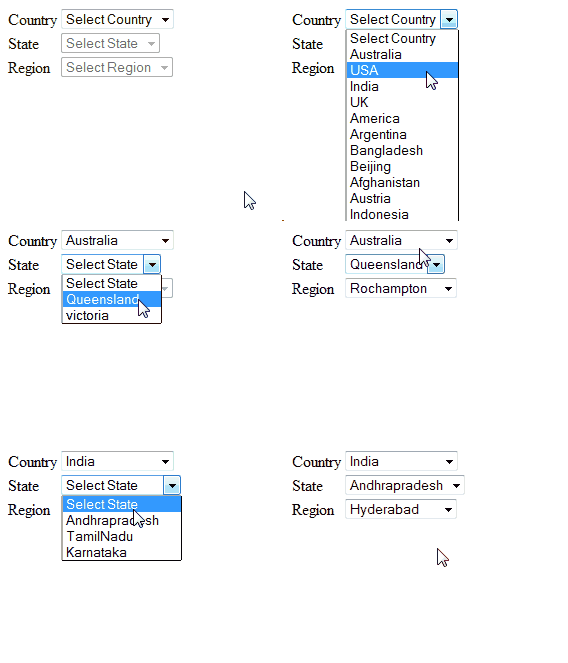
Demo:


How to Display Progress Bar on Button Click in Asp.net Jquery

How to Display Progress Bar on Button Click in Asp.net Jquery

.Aspx


<html xmlns="http://www.w3.org/1999/xhtml">
<head id="Head1" runat="server">
    <title>jQuery show progress bar on button click asp.net</title>
    <script type="text/javascript" src="http://code.jquery.com/jquery-1.8.2.js"></script>
    <style type="text/css">
        .sample {
            background-color: #DC5807;
            border: 1px solid black;
            border-collapse: collapse;
            color: White;
        }
    </style>
</head>
<body>
    <form id="form1" runat="server">
        <div id="DisableDiv"></div>
        <input type="button" id="btnClick" value="Get Data" />
        <div id="testdiv"></div>
    </form>
    <script type="text/javascript"> $(function() { $('#btnClick').click(function() { $('#DisableDiv').fadeTo('slow', .6); $('#DisableDiv').append('<img src="loading.gif" style="background-color:Aqua;position:fixed; top:40%; left:46%;"/>'); setTimeout(function() { GetData() }, 1000) }) }); function GetData() { $.ajax({ type: "POST", contentType: "application/json; charset=utf-8", url: "ShowLoadingImageonButtonClick.aspx/BindDatatable", data: "{}", dataType: "json", success: function(data) { var theHtml = data.d; $('#testdiv').html(theHtml) $('#DisableDiv').html(""); }, error: function(result) { alert("Error"); } }); } </script>
</body>
</html>


C# Code


using System;
using System.Data;
using System.Data.SqlClient;
using System.Web.Services;
using System.Web.UI;
using System.Web.UI.WebControls;


protected void Page_Load(object sender, EventArgs e)
{
 } [WebMethod] public static string BindDatatable()
 {
GridView gv = new GridView();
 System.IO.StringWriter stringWriter = new System.IO.StringWriter();
 HtmlTextWriter htmlWriter = new HtmlTextWriter(stringWriter);
DataTable dt = new DataTable();
 using (SqlConnection con = new SqlConnection("Data Source=SureshDasari;
Initial Catalog=MySampleDB;Integrated Security=true"))
 {
using (SqlCommand cmd = new SqlCommand("select UserId,UserName,Location from UserInformation", con))
{
 con.Open();
SqlDataAdapter da = new SqlDataAdapter(cmd);
da.Fill(dt);
 }
 }
 gv.HeaderStyle.CssClass = "sample";
gv.DataSource = dt;
 gv.DataBind();
 gv.RenderControl(htmlWriter);
 return stringWriter.ToString();
 }


VB Code


Imports System.Data
Imports System.Data.SqlClient
Imports System.Web.Services
Imports System.Web.UI
Imports System.Web.UI.WebControls
Partial Class VBCode Inherits
System.Web.UI.Page
Protected Sub Page_Load
(ByVal sender As Object, ByVal e As EventArgs)
End Sub <WebMethod()> _
 Public Shared Function BindDatatable() As String
 Dim gv As New GridView()
 Dim stringWriter As New System.IO.StringWriter()
Dim htmlWriter As New HtmlTextWriter(stringWriter)
Dim dt As New DataTable()
Using con As New SqlConnection("Data Source=SureshDasari;Initial Catalog=MySampleDB;Integrated Security=true")
Using cmd As New SqlCommand("select UserId,UserName,Location from UserInformation", con)
con.Open()
Dim da As New SqlDataAdapter(cmd)
da.Fill(dt)
End Using
 End Using
gv.HeaderStyle.CssClass = "sample"
gv.DataSource = dt gv.DataBind()
gv.RenderControl(htmlWriter)
Return stringWriter.ToString() '
End Function
End Class


Download


Thursday, 13 February 2014

How to Get Asp.net Textbox Value OR Get Asp.net Label Value Using JavaScript

How to Get Asp.net Textbox Value OR Get Asp.net Label Value Using JavaScript


Get label value
 var amount = document.getElementById("<%=lblAmount.ClientID %>").innerHTML
Get label value
 var name = document.getElementById("<%=txtUserName.ClientID %>").value;


<html xmlns="http://www.w3.org/1999/xhtml">
<head runat="server"><title>Get Asp.net Textbox Value in JavaScript</title>
    <script type="text/javascript"> function getvalues() { var name = document.getElementById("<%=txtUserName.ClientID %>").value; var amount = document.getElementById("<%=lblAmount.ClientID %>").innerHTML; alert("Textbox Value: " + name + "\n" + "Label Value: " + amount); return false } </script>
</head>
<body>
    <form id="form1" runat="server">
        <div>UserName:<asp:textbox id="txtUserName" runat="server" /><br />
            Amount:<asp:label id="lblAmount" runat="server" text="10000" /><br />
            <asp:button id="btnValidate" runat="server" text="Get Values" onclientclick="javascript:getvalues();" />
        </div>
    </form>
</body>
</html>


UserName
Amount


Download


How to Floating DIV on Page Scroll jQuery Fixed Header DIV While Scrolling Using Jquery c#

How to Floating DIV on Page Scroll  jQuery Fixed Header DIV While Scrolling Using Jqueryc#


<html>
<head>
    <meta http-equiv="content-type" content="text/html; charset=UTF-8">
    <title>jQuery - Creating a Floating Navigation DIV on Page Scroll</title>
    <script type='text/javascript' src='https://ajax.googleapis.com/ajax/libs/jquery/1.7.2/jquery.min.js'></script>
    <style type='text/css'>
        body {
            background-color: #333;
            color: #999;
            font: 12px/1.4em Arial,sans-serif;
        }

        #wrap {
            margin: 10px auto;
            background: #666;
            padding: 10px;
            width: 700px;
        }

        #header {
            background-color: #666;
            color: #FFF;
        }

        #logo {
            font-size: 30px;
            line-height: 40px;
            padding: 5px;
        }

        #navWrap {
            height: 30px;
        }

        #nav {
            padding: 5px;
            background: #999;
        }

            #nav ul {
                margin: 0;
                padding: 0;
            }

            #nav li {
                float: left;
                padding: 3px 8px;
                background-color: #FFF;
                margin: 0 10px 0 0;
                color: #F00;
                list-style-type: none;
            }

                #nav li a {
                    color: #F00;
                    text-decoration: none;
                }

                    #nav li a:hover {
                        text-decoration: underline;
                    }

        br.clearLeft {
            clear: left;
        }

        ​
    </style>
    <script type='text/javascript'> $(function() { // Stick the #nav to the top of the window var nav = $('#nav'); var navHomeY = nav.offset().top; var isFixed = false; var $w = $(window); $w.scroll(function() { var scrollTop = $w.scrollTop(); var shouldBeFixed = scrollTop > navHomeY; if (shouldBeFixed && !isFixed) { nav.css({ position: 'fixed', top: 0, left: nav.offset().left, width: nav.width() }); isFixed = true; } else if (!shouldBeFixed && isFixed) { nav.css({ position: 'static' }); isFixed = false; } }); }); </script>
</head>
<body>
    <form id="form1">
        <div id="wrap">
            <!-- The header code, including the menu -->
            <div id="header">
                <div id="logo">Start Slowly Scrolling Down<br />
                    This Page!</div>
                <div id="navWrap">
                    <div id="nav">
                        <ul>
                            <li><a href="#" class="smoothScroll">Demo Link 1</a></li>
                            <li><a href="#" class="smoothScroll">Demo Link 2</a></li>
                            <li><a href="#" class="smoothScroll">Demo Link 3</a></li>
                            <li><a href="#" class="smoothScroll">Demo Link 4</a></li>
                        </ul>
                        <br class="clearLeft" />
                    </div>
                </div>
            </div>
            <!-- The main page content (just filler for this demo) -->
            <p>fantasyaspnet.blogspot.com offers Download free Demo code source sample example program Articles of GridView JavaScript JQuery windows forms application in vb c# asp.net

</p>
        </div>
    </form>
</body>
</html>


Download